Using AWS Credential File#
When configuring a new S3 account, you can choose to authenticate with the Access Key and Secret Key, or you can
use the AWS Credential File for authentication.
This document will introduce how to configure authentication using the AWS Credential File.
Configuration Steps#
1. Open the Add New Account dialog#
Select Accounts -> Add New Account... from the menu bar.
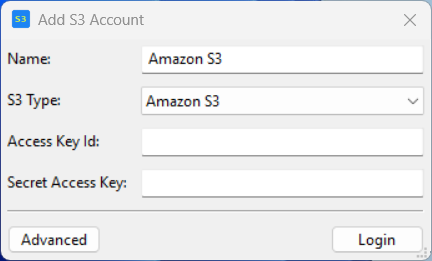
In the Add New Account dialog, enter the Name and S3 Type.
When authenticating with the
AWS Credential File, there is no need to fill in theAccess KeyandSecret Key.
Then click the Advanced button to open the advanced configuration dialog.
2. Advanced configuration dialog#
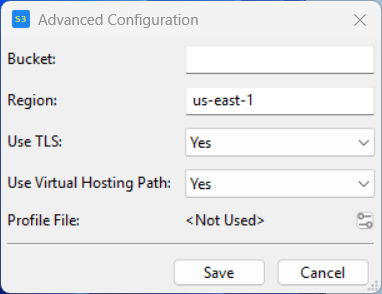
- When the value of
Profile Fileis shown as<Not Used>, it means the current account does not authenticate using theAWS Credential File. - When you have configured and enabled the
AWS Credential File, the name of the currently selected profile will be shown here.
In the advanced configuration dialog, click the button after the Profile File row to open the AWS Credential File configuration dialog.
3. AWS Credential File configuration dialog#
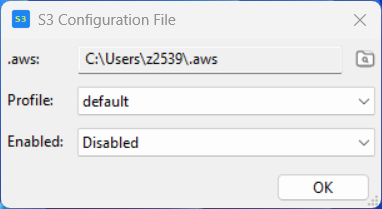
By default, we try to find an available credential file in the default file directory.
Default directories:
Windows:%UserProfile/.aws/LinuxormacOS:$HOME/.aws/
If your configuration directory is not at the AWS CLI default location, you can modify the .aws value in the dialog.
A
credential filemay contain one or more profiles. You can select the profile you want to use from theProfiledropdown.
Finally, once you have confirmed your configuration, select Enabled from the Enabled dropdown to enable it.
When you no longer want to use it, you can set it to Disabled. In this case, you need to configure the Access Key and Secret Key for authentication.
After the configuration is complete, click the OK button to save the configuration.
References#
For more information about the AWS Credential File, please refer to: