View or configure bucket versioning#
View the bucket versioning information#
First, you need to correctly configure your account information to connect to your S3 server.
On the application's main page, select the bucket you want to view, like this:
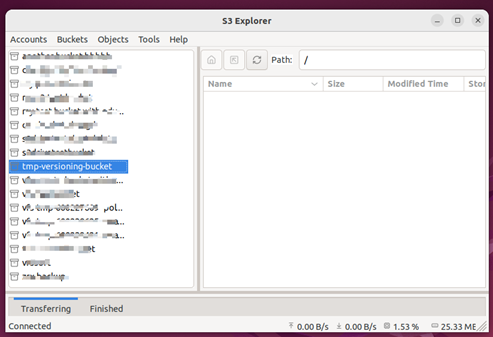
Then, view the bucket's versioning information using one of the following methods:
-
Context Menu:
Select Bucket->Right-click the mouse->Versioning -
Menu Bar:
Select Bucket->Bucketsmenu item ->Versioning
After that, the bucket versioning dialog box will open:
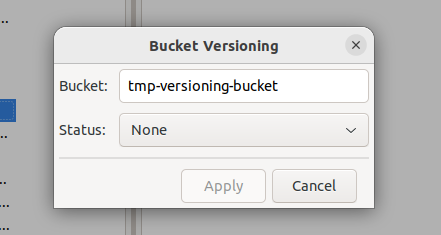
The meaning of Status#
None: Versioning is not enabled for the current bucket.Enabled: Versioning is currently enabled for the bucket.Suspended: Versioning was previously enabled for the bucket, but it is currently suspended.
Configure bucket versioning information#
Configure bucket versioning on the same dialog.
Select the new versioning status you want to set from the Status drop-down list::
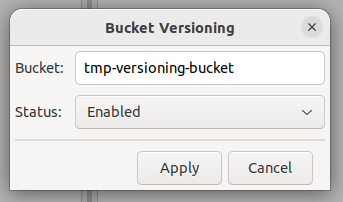
After making your selection, the Apply button changes from a disabled state to an enabled state;
Click the Apply button to apply your changes.
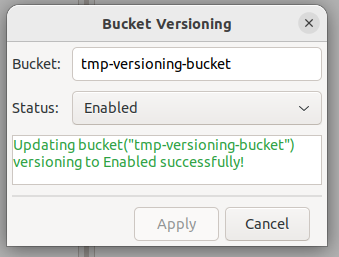
You can select the Cancel button to close the current dialog box.
Rules for modifying the Status:#
The rules for modifying S3 versioning are as follows; the new status that can be modified depend on the bucket's current versioning status:
| Current Status | Valid New Status | Invalid New Status | Comment |
|---|---|---|---|
None | Enabled | Suspended | If the current status is None, new status can only be Enabled |
Enabled | Suspended | None | If the current status is Enabled, new status can only be Suspended |
Suspended | Enabled | None | If the current status is Suspended, new status can only be Enabled |
- If versioning is not currently enabled for your bucket, you can enable it.
- If versioning is already enabled for your bucket, you can choose to suspend it, but you cannot completely disable it.
- If your bucket has versioning enabled but currently in a suspended state, you can choose to re-enable versioning, but you cannot permanently disable it.