如何在 Linux 平台上安装运行 S3 Explorer#
本文将基于 Ubuntu 22.04.5 LTS 版本进行。
如果你正在使用其他的 Linux 发行版,安装步骤也是类似的。
安装过程中遇到任何问题,欢迎反馈给我们。 反馈问题
下载最新版 S3 Explorer Linux 版#
首先,请确保你下载了 最新版 S3 Explorer Linux 版本的安装包。
你可以从这里下载: S3 Explorer Linux 版本.
赋予执行权限#
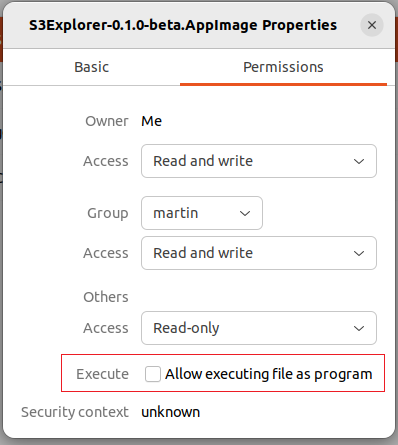
下载的 Linux 版本默认是没有执行权限的,你需要手动添加。
通过图形界面#
右键点击 .AppImage 文件 -> 属性 (Properties) -> 权限 (Permissions) 选项卡 -> 勾选 "允许作为程序执行文件" (Allow executing file as program)。
通过命令行#
打开终端,然后使用 chmod 命令为文件添加执行权限:
Bash
chmod +x S3Explorer-{version}.AppImage运行 AppImage 文件#
完成上述步骤后,你就可以直接运行 S3Explorer 了。
初次运行,建议通过命令行模式来启动。
因为,你的 Linux 发行版可能会缺少必要的依赖,图形界面方式经常无法迅速发现这些错误!
通过命令行#
在终端中,通过以下方式运行:
Bash
./S3Explorer-{version}.AppImageFUSE 缺失#
极少数精简版或服务器版 Linux 系统可能没有预装 FUSE。在这种情况下,你需要手动安装它。
当你从命令行执行 AppImage 时, 遇到如下错误,那么你需要安装 FUSE:
Bash
linux@linux:~$ ./S3Explorer-0.1.0-beta.AppImage dlopen(): error loading libfuse.so.2 AppImages require FUSE to run. You might still be able to extract the contents of this AppImage if you run it with the --appimage-extract option. See https://github.com/AppImage/AppImageKit/wiki/FUSE for more information - 在基于
Debian的系统上:
Bash
sudo apt-get install fuse- 在基于
Red Hat的系统上:
Bash
sudo yum install fuse通过图形界面#
双击 .AppImage 文件即可启动应用。