单个 Bucket 模式#
S3 Explorer supports connecting to a single specified bucket:
For security and access control reasons, you may not be granted permission to access all buckets with your authorization key. In this case, you can use the single bucket mode.
The configuration steps are as follows#
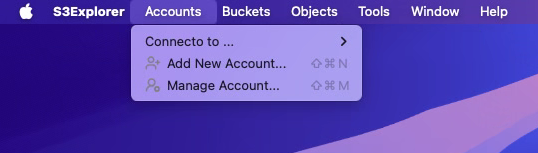
- Open S3 Explorer, select
Accounts->Add New Account...from the menu bar.
- In the
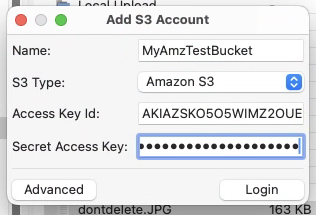
Add S3 Accountdialog, first configure the basic account information, as shown in the example below:
- Then, click the
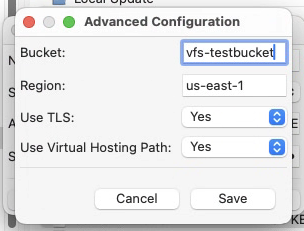
Advancedbutton to open the advanced configuration dialog.
In the Bucket textbox, enter the information for the Bucket you want to connect to,
such as vfs-testbucket.
If your Bucket is not located in us-east-1, you will need to configure this field separately.
- After correctly configuring the above information, click
Saveto close the advanced configuration dialog. - Then, in the
Add S3 Accountdialog, clickLogin. - If all configurations are correct, you will successfully connect to the specified bucket.
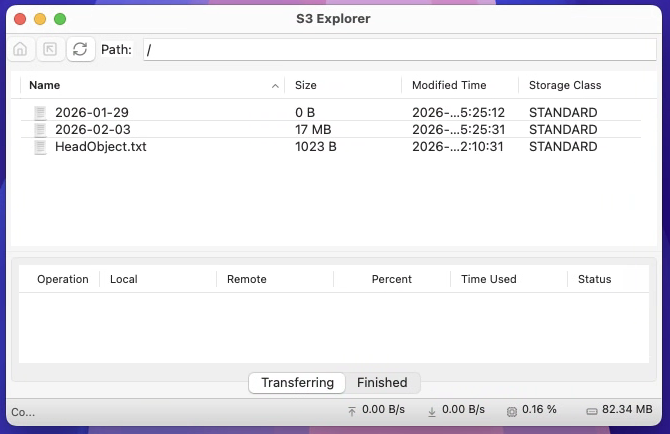
In single bucket mode, the Buckets menu item in the menu bar is disabled and cannot be used.